Invite-only beta. Access is currently limited to invited testers. Request beta access. Already invited? Sign in.
What an agent can actually do
Beyond plain conversation, an agent's tools list controls what real capabilities it's granted.
Each one is opt-in per agent — granted from the + Add capabilities menu at hire time or
any time after, in Settings.
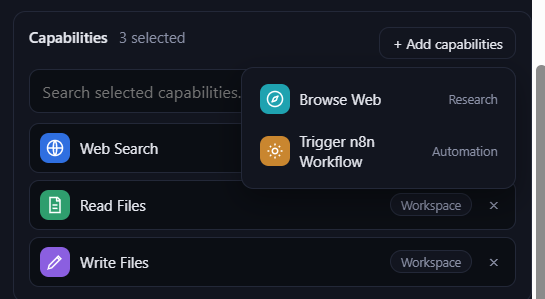
🌐 Web Search
Anthropic's own hosted search tool. The agent asks a question, Anthropic runs the actual search server-side, and the resolved result comes back as part of its reply — no separate round trip your server has to manage. Costs a little extra per search on top of normal token costs.
Good for: "what's the latest on X", finding a URL to look at more closely, quick factual lookups.
🧭 Browse Web
A real headless browser (Chromium, via Playwright) the agent can point at a URL — no setup needed on your end. It gets back the page's visible text plus its links, JavaScript included — so it works on modern, client-rendered sites, not just static HTML. To follow a link it found, the agent calls this again with that link's href.
Deliberately read-only for now: no typing into forms, no logging in, no submitting anything. Every navigation — the URL requested, plus every redirect and sub-resource the page itself loads — is checked against a private/loopback/link-local address block-list first, so a page can't be used to reach anything internal to Garagent's own infrastructure (including cloud-metadata-style addresses).
Good for: reading one specific page in full (Web Search only gives a snippet), following a chain of links to research something, checking a page that needs JavaScript to render its content.
📄 Read Files
Read access to one shared sandbox folder, workspace/, created automatically on first boot.
Handles plain text (200 KB cap) and .pdf (15 MB cap, text extracted automatically) — a scanned
PDF with no text layer comes back as a clear error rather than garbage. Anything else (an image, a zip, a
.docx) is detected and rejected rather than force-read. Every path is checked against the
workspace root, including through symlinks, so an agent can never read outside it.
Good for: letting an agent reference a document, spreadsheet export, or PDF you've dropped into the shared workspace.
✍️ Write Files
Write (create or overwrite) access to the same shared workspace/ folder — granted separately
from Read Files, so you can hand out read-only access without write, or vice versa. Plain text only, 500 KB
cap per file. Missing parent folders are created automatically, and every write is atomic (a temp file
first, then a rename over the target), so a crash mid-write can't leave a half-written file behind.
Good for: an agent producing a report, notes, or draft that another agent (or you) can pick up afterward.
🔗 Trigger n8n Workflow
A narrow bridge to your own n8n instance. An agent never gets to name an arbitrary webhook — it can only trigger one of the workflow ids on its own allow-list, which are looked up against a small registry to find the real webhook path. Two layers of scoping: the model gets a short menu of named workflows with descriptions, never the underlying address space.
Needs your n8n instance connected and at least one workflow registered — see Global Settings — before any agent can use it.
Good for: handing off to automations you've already built elsewhere — sending a Slack message, updating a spreadsheet, kicking off a longer external process.
Next
✨ Features
See where these capabilities fit into the bigger picture — Chat, Work, Skills, and more.
🚀 Quick Start
Haven't signed in yet? Start here.